Encrypted Persistent Storage for Peer Pods with the CAA CSI Block Driver
Introduction
When you use the Kata remote hypervisor (peer-pods) for confidential containers, you can run into problems if your workload relies on Kubernetes CSI storage for persistent data.
Until v0.21.0 we had csi-wrapper. It sat in front of existing CSI drivers and replayed attach/mount inside the PodVM (the confidential VM that runs the pod). This post is the deep dive if you want the internals. It worked, but it had limits that showed up as soon as you tried it on a managed cluster. The volume still counted against the node’s attach limit even though it wasn’t attached there. Some CSI drivers talk to the API server and cache Nodes or PVs, then get confused when the “node” is a VM with no Node object. And you can’t patch CSI drivers on OpenShift or AKS. That code isn’t in current Cloud API Adaptor (CAA) releases.
For the last few months we’ve been doing this a different way. A dedicated CSI driver creates the cloud disk, writes Kata direct-volume metadata, and CAA attaches the disk to the PodVM. Encryption is optional. If you turn it on, the LUKS key comes from Trustee/KBS only after the PodVM attests. The host never sees the passphrase. That path landed in CAA main in #3155. It is not in the latest release (v0.22.0); you need a build from main.
Project status: The CAA CSI Block Driver is currently hosted at confidential-devhub/caa-csi-block-driver. Work is underway to upstream it into the Confidential Containers organization. Volume passthrough is in CAA v0.22.0 (#3037). LUKS encryption needs CAA main (#3155).
The Problem
Normal CSI drivers (AWS EBS CSI, Azure Disk CSI) attach a volume to the kubelet node and mount it into the pod. That breaks with Peer Pods because:
- The pod isn’t on the node. It’s in a separate VM. There’s no local block device to mount.
- The node is untrusted. In our threat model, the host OS, cloud operator, and the Kubernetes control plane are all outside the trust boundary. Keys can’t live there.
- EmptyDir doesn’t persist. We have encrypted ephemeral storage already, but it’s gone when the pod dies.
Some people skip CSI and mount object storage from inside the container (S3 Mountpoint, Azure BlobFuse). That uses FUSE, usually needs a privileged container, and it isn’t a PVC. It’s also object storage, not a block device, which rules out most databases.
So the requirements were:
- Block volumes created through cloud APIs, persist independently of pod lifecycle
- Metadata passed into the PodVM without secrets on the host
- Encryption/decryption inside the TEE only
- Standard Kubernetes PVC semantics, no app changes
Threat Model
The big one is a malicious cloud operator — someone with hypervisor access or the ability to snapshot your disk from the storage backend. LUKS2 full-disk encryption handles this because the key never touches the host. They get ciphertext, nothing useful.
Other scenarios we defend against:
- Compromised kubelet node: can read the node filesystem and all pod metadata, but only ever sees a KBS path (
kbs-key-id), not the actual passphrase. - Disk snapshot attack: cloning the volume from the cloud console gives you an encrypted blob. Without the key it’s useless.
- Host memory forensics: the key lives only in PodVM memory, which is hardware-protected by the TEE. It’s not in host RAM.
- MITM on key delivery: attestation establishes an encrypted session between the PodVM and KBS. The key comes back JWE-wrapped.
What’s trusted: the PodVM (hardware-attested TEE) and KBS. Everything else we treat as potentially compromised — the control plane, worker node, hypervisor, storage backend.
Rollback is out of scope. Someone with storage access can restore an older snapshot of the encrypted disk. LUKS does not stop that. Stopping it would need extra machinery, such as a monotonic counter, which this path does not have.
Architecture
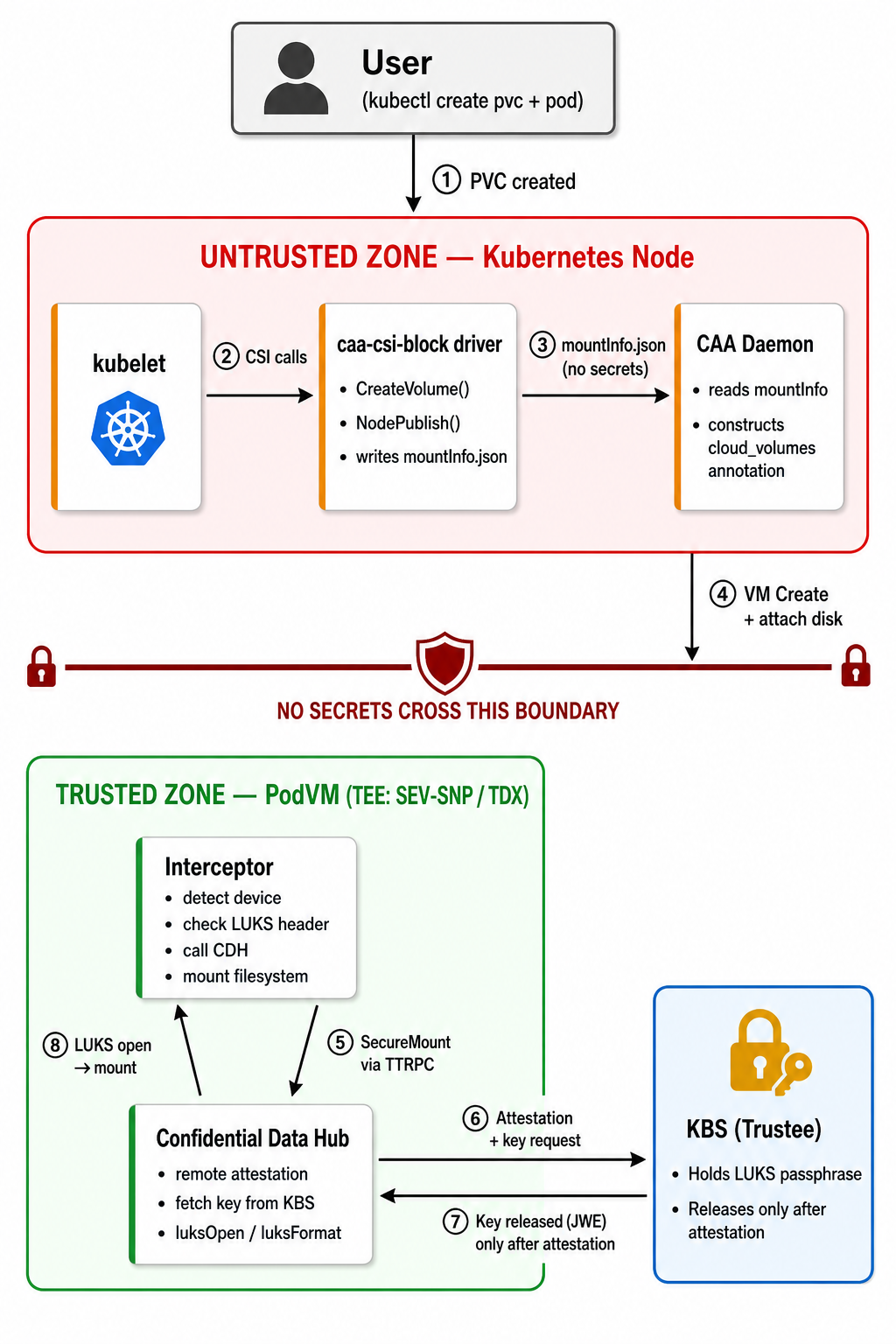
The main thing to take away from this: the encryption key never leaves the PodVM. The host sees an encrypted disk it can’t read. The CSI driver on the host doesn’t know the key, it only passes encrypt-type and kbs-key-id through volume metadata. Encryption and decryption happen inside the TEE only.
How It Works
1. User Creates a PVC with Encryption Parameters
The StorageClass specifies what encryption to use and where the key lives in KBS. Not the key itself — CAA reads encrypt-type and kbs-key-id from mountInfo.json (#3155):
apiVersion: storage.k8s.io/v1
kind: StorageClass
metadata:
  name: caa-block-azure-encrypted
parameters:
  cloudProvider: azure
  azureSubscriptionId: "<SUBSCRIPTION_ID>"
  azureResourceGroup: "<RESOURCE_GROUP>"
  azureLocation: eastus
  azureDiskSKU: StandardSSD_LRS
  encrypt-type: luks2
  kbs-key-id: default/luks-key/volume-key
provisioner: caa-csi-block.csi.confidentialcontainers.io
reclaimPolicy: Delete
volumeBindingMode: Immediate
kbs-key-id is the KBS resource path, with no kbs:/// prefix. The interceptor adds that prefix when it calls CDH. The host only ever sees this path string, never the passphrase.
2. CSI Driver Creates a Raw Cloud Volume
The controller calls the cloud provider to create a blank block volume:
- AWS:
ec2.CreateVolume, EBS volume tagged withcaa-csi-volume-id - Azure:
disksClient.BeginCreateOrUpdate, Managed Disk in the resource group
At this point it’s just raw bytes. No filesystem, no encryption header. That gets done later inside the TEE.
3. Node Server Writes Volume Metadata (No Secrets)
When the pod gets scheduled, kubelet calls NodePublishVolume. The CAA CSI driver writes a mountInfo.json to the Kata direct-volumes directory:
{
  "volume-type": "directvol",
  "device": "/subscriptions/<SUB>/resourceGroups/<RG>/providers/Microsoft.Compute/disks/csi-vol-pvc-xyz",
  "fstype": "ext4",
  "metadata": {
    "cloud-volume-id": "pvc-xyz",
    "cloud-volume-path": "/subscriptions/<SUB>/resourceGroups/<RG>/providers/Microsoft.Compute/disks/csi-vol-pvc-xyz",
    "cloud-provider": "azure",
    "encrypt-type": "luks2",
    "kbs-key-id": "default/luks-key/volume-key"
  }
}
This file stays on the host. No secrets in it — CAA only needs the disk ID, filesystem type, encrypt-type, and the KBS path.
4. CAA Attaches the Volume to the PodVM
CAA picks up mountInfo.json and:
- Builds the
cloud_volumespod annotation with disk IDs, LUN assignments, mount points, and encryption params - Creates the PodVM with the disk attached (Azure: data disk on the VM create API call; AWS:
AttachVolumeafter instance start)
5. Inside the TEE: Attestation → Key Fetch → Mount
These steps run inside the PodVM. The agent-protocol-forwarder sits in front of kata-agent. When Kata sends CreateContainer, the interceptor looks at the cloud_volumes annotation. If encrypt-type is set, it takes the encrypted path below instead of a normal format-and-mount.
- Device detection. The interceptor finds the attached block device (
/dev/disk/azure/data/by-lun/<LUN>on Azure,/dev/disk/by-id/nvme-Amazon_Elastic_Block_Store_*on AWS). - LUKS header check.
isLuks()reads the first 6 bytes for the LUKS magic (LUKS\xba\xbe) so we know whether this is a first mount or a remount. It does not check the rest of the header. CDH later opens the volume with cryptsetup and the passphrase from KBS. If the header was changed and that passphrase no longer unlocks a key slot, the open fails. - CDH SecureMount call. Connects to CDH via TTRPC at
/run/confidential-containers/cdh.sock. The interceptor sets:sourceType:"empty"for a fresh disk,"encrypted"if the LUKS header was foundkey:"kbs:///"plus thekbs-key-idfrom StorageClass (e.g."kbs:///default/luks-key/volume-key")mapperName:caa-vol-0,caa-vol-1, … matching thecloud_volumeskeys
- Remote attestation. CDH triggers the Attestation Agent. It produces hardware evidence (SEV-SNP report or TDX quote) and KBS verifies it.
- Key release. KBS releases the LUKS passphrase only after attestation passes. JWE-wrapped. Key exists only in TEE memory from this point.
- LUKS open/format. CDH does this, not the interceptor. Fresh disk: format then open. Already encrypted: open only.
- Filesystem. CDH creates ext4 on the mapper device if needed and mounts it.
On the LUKS header check: A new disk and a disk that already has encrypted data look the same until we look at the header. isLuks() only reads the first 6 bytes (the LUKS magic) so we know whether to format or just open. If that read fails, we stop with an error. We do not treat a failed read as an empty disk, because that could overwrite data. If someone overwrites those 6 bytes, the disk no longer looks like LUKS, and CDH may format it. The volume is gone, but they still cannot read the old data without the key from KBS.
6. Cleanup on Pod Deletion
When the pod is deleted:
- Filesystem is unmounted
- LUKS mapping is closed (
cryptsetup close caa-vol-0) - PodVM is terminated and the disk is detached
- The CSI controller can delete the cloud volume per the
reclaimPolicy
Data survives pod restarts. The LUKS2 header and encrypted data stay on the cloud volume after the PodVM is gone. When a new PodVM comes up for the same PVC, the interceptor sees the existing LUKS header, CDH gets the key, and it opens the volume without formatting. Data is still there.
Performance
LUKS2 uses aes-xts-plain64 with AES-NI hardware acceleration, which every modern cloud instance has. Cloud block storage (EBS, Managed Disks) is network-attached, so the network is usually the bottleneck, not CPU-side encryption. Local NVMe can show more dm-crypt overhead; cloud disks usually don’t.
Extra work at pod startup (typical cryptsetup / KBS costs, not measured on this stack):
- Attestation: a few seconds. Longer if verification collateral is not cached.
- LUKS format (first mount only): a few seconds. Volume size doesn’t matter —
luksFormatonly writes the header. Argon2id key derivation dominates. - LUKS open (later mounts): similar, minus format.
PodVM boot is still the bulk of startup (VM create + boot + agent), so this is a small add-on, not a second boot.
Trying It Out
Prerequisites
- A Kubernetes cluster with Kata Containers and Cloud API Adaptor from main (needs #3155; v0.22.0 is not enough for encryption)
- Trustee (KBS) deployed with a LUKS key provisioned
- The CSI driver deployed (see below)
Deploy the CSI Driver
kubectl apply -f deploy/namespace.yaml
kubectl apply -f deploy/rbac.yaml
kubectl apply -f deploy/csi-driver.yaml

# Azure example (edit subscription/resource group, encrypt-type, and kbs-key-id first)
kubectl apply -f deploy/daemonset-azure.yaml
kubectl apply -f deploy/storageclass-azure-encrypted.yaml
deploy/storageclass-azure-encrypted.yaml uses encrypt-type and kbs-key-id (no kbs:/// prefix). Helm with cdh.enabled=true emits the same names.
Provision a Secret in KBS
Register a LUKS passphrase in your KBS instance. The path must match kbs-key-id in your StorageClass:
# Generate a 32-byte random key
dd if=/dev/urandom bs=32 count=1 | base64 > /tmp/luks-key

# Upload to KBS at path default/luks-key/volume-key
# (this matches kbs-key-id: default/luks-key/volume-key in the StorageClass)
# Method depends on your Trustee deployment — CLI, API, or operator:
kbs-client --url https://kbs.example.com:8080 \
  config --admin-token-file /path/to/admin-token \
  set-resource \
  --path default/luks-key/volume-key \
  --resource-file /tmp/luks-key
Create an Encrypted Volume and Write Data
apiVersion: v1
kind: PersistentVolumeClaim
metadata:
  name: encrypted-pvc
spec:
  accessModes: [ReadWriteOnce]
  resources:
    requests:
      storage: 5Gi
  storageClassName: caa-block-azure-encrypted
---
apiVersion: v1
kind: Pod
metadata:
  name: secret-writer
spec:
  runtimeClassName: kata-remote
  containers:
  - name: app
    image: busybox
    command: ["sh", "-c", "echo 'confidential data' > /secure/secret.txt && sleep 3600"]
    volumeMounts:
    - name: encrypted-vol
      mountPath: /secure
  volumes:
  - name: encrypted-vol
    persistentVolumeClaim:
      claimName: encrypted-pvc
Verify It Works
# PVC is bound and volume is provisioned
$ kubectl get pvc encrypted-pvc
NAME            STATUS   VOLUME                                     CAPACITY   STORAGECLASS
encrypted-pvc   Bound    pvc-a1b2c3d4-e5f6-7890-abcd-ef1234567890   5Gi        caa-block-azure-encrypted

# Data is accessible inside the TEE
$ kubectl exec secret-writer -- cat /secure/secret.txt
confidential data
The volume at /secure is LUKS2-encrypted on the cloud disk. If someone snapshots that volume or pulls it offline, they get ciphertext. The key only exists inside the TEE after attestation, so there’s no way to recover the data from the host side.
To read the data after that pod is gone, start a new pod with the same PVC. Same StorageClass and kbs-key-id. The new PodVM attests, gets the key, and opens the existing volume. You do not format again.
Multi-Provider Support
The driver has a pluggable provider architecture. Each provider implements the BlockVolumeProvider interface:
| Provider | Backend | Volume Expansion | Snapshots | Cloning |
|---|---|---|---|---|
| AWS | EBS | Yes* | Yes | Yes |
| Azure | Managed Disks | Yes* | Yes | Yes |
| LibVirt | Raw disk files | No | No | Yes** |
* Cloud-disk resize only. Expanding a LUKS volume also needs a resize inside the guest, which this path does not do yet.
** LibVirt clones by copying the disk file (not atomic — don’t write the source while cloning). Expansion and snapshots are not implemented.
To add a new provider you implement four methods: CreateVolume, DeleteVolume, GetVolumeInfo, and VolumeExists. Expansion, snapshots, and cloning are behind optional interfaces (VolumeExpander, VolumeSnapshotter, VolumeCloner) so you can add them without touching existing providers.
What’s Next
What we’re working on next:
- Upstreaming into the CoCo org. Immediate priority. Need to get it into CI/CD and test across TEE platforms (SEV-SNP, TDX, IBM Secure Execution).
- Topology-aware provisioning. Volumes should be created in the same AZ as the PodVM to avoid cross-AZ attachment failures.
- GCP Persistent Disk provider. The interface is there, would be a good first contribution for someone.
- Per-PVC key rotation. Distinct keys per volume with rotation. We haven’t figured out the exact design yet.
If the workload is attested but the disk isn’t encrypted, that’s the hole this closes.
Contributions welcome. GCP support would be a good one: BlockVolumeProvider interface, four methods. For key rotation or topology work, open an issue.
Code: confidential-devhub/caa-csi-block-driver
Slack: #confidential-containers-peerpod in the CNCF workspace.