Integrate Trustee with the External Secrets Operator
Introduction
The Trustee operator simplifies configuring secrets and serving them to confidential container pods that execute inside trusted execution environments (TEEs). You can set up the required secrets as Kubernetes Secret objects and make them accessible through the Trustee. You can use the same mechanism to integrate with external secret managers.
For instance, you can use the Secrets Store CSI Driver or the External Secrets Operator to synchronize secrets from external sources, such as HashiCorp Vault, and make them available to confidential containers (CoCo) executing in remote TEEs.
This figure shows the connection between Trustee and secret store
solutions:
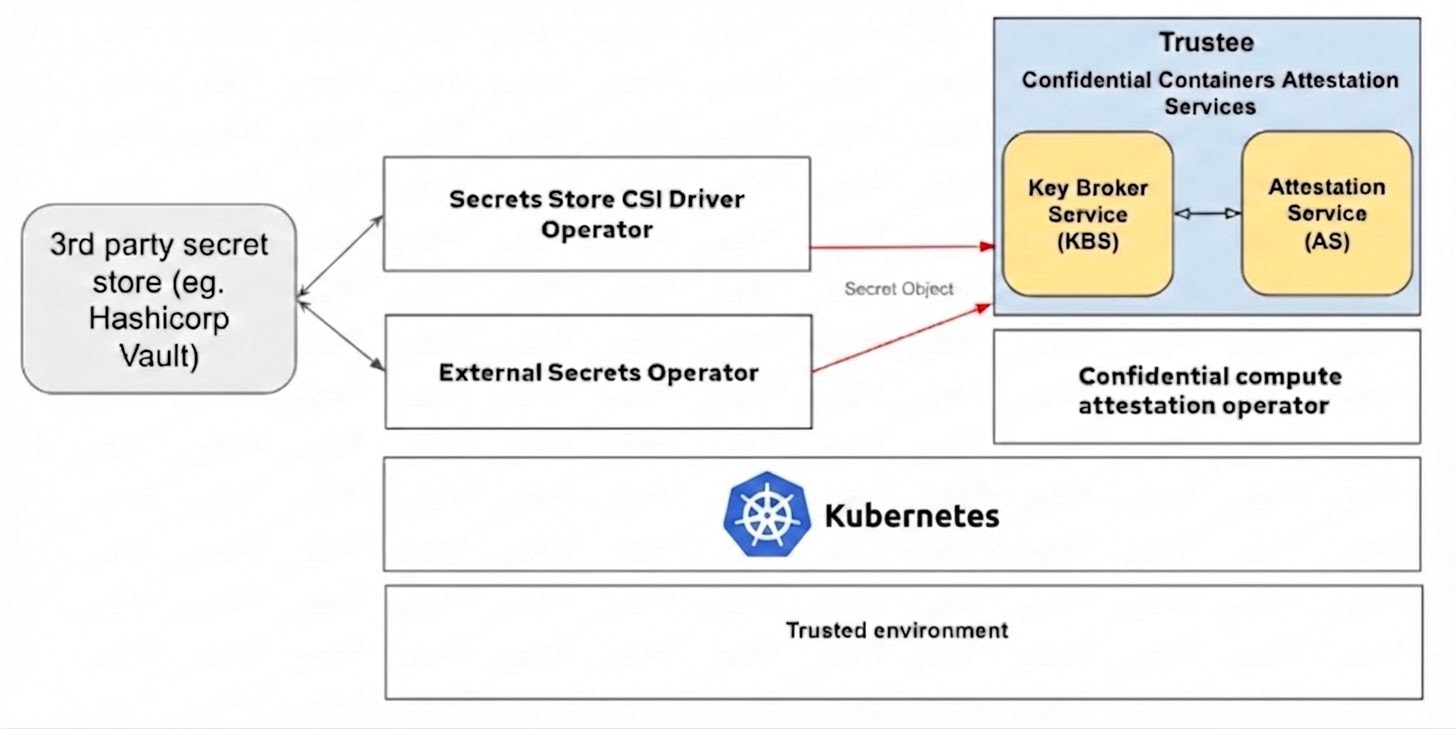
In this blog post, we are focusing on the integration of Trustee with External Secrets Operator for secure, dynamic secret delivery to CoCo pods. We cover installing and configuring the Operator, setting up Vault authentication and policies, creating SecretStore and ExternalSecret objects, verifying the setup, and configuring Trustee to use the fetched secrets within a pod, including how to update and refresh those secrets.
There is another way to integrate Vault with Trustee using vault plugin which require different configurations. This post only shows configurations for External Secrets Operator. This solution works only with Trustee Operator!
Prerequisites
The following instructions are assuming a Kubernetes cluster is set up with the Operator Lifecycle Manager (OLM) running and the Trustee Operator is deployed. Also helm needed for deploying the HashiCorp Vault to the cluster.
Install External Secrets Operator
Create and apply the subscription
kubectl apply -f - << EOF
apiVersion: operators.coreos.com/v1alpha1
kind: Subscription
metadata:
  name: my-external-secrets-operator
  namespace: operators
spec:
  channel: alpha
  name: external-secrets-operator
  source: operatorhubio-catalog
  sourceNamespace: olm
EOF
Verify installation
watch kubectl get csv -n operators
Example output:
NAME                                DISPLAY                     VERSION   REPLACES                            PHASE
external-secrets-operator.v0.11.0   External Secrets Operator   0.11.0    external-secrets-operator.v0.10.7   Succeeded
Create and apply OperatorConfig
Before any other resources provided by this Operator can be deployed, it is essential to create an OperatorConfig resource.
kubectl apply -f - << EOF
apiVersion: operator.external-secrets.io/v1alpha1
kind: OperatorConfig
metadata:
  name: cluster
  namespace: operators
spec:
  prometheus:
    enabled: true
    service:
      port: 8080
  resources:
   requests:
     cpu: 10m
     memory: 96Mi
   limits:
     cpu: 100m
     memory: 256Mi
EOF
Verify the cluster-external-secrets pods are running
$ kubectl get pod -n operators
NAME                                                            READY   STATUS    RESTARTS   AGE
cluster-external-secrets-7587467ccd-k4z2v                       1/1     Running   0          3h13m
cluster-external-secrets-cert-controller-65cdddddf7-8vmbl       1/1     Running   0          3h13m
cluster-external-secrets-webhook-76cbb9469f-k8jq9               1/1     Running   0          3h13m
external-secrets-operator-controller-manager-5b965ff54d-d9h5n   1/1     Running   0          3h19m
Configure External Secrets using HashiCorp Vault
Install Vault in development mode
helm repo add hashicorp https://helm.releases.hashicorp.com

helm repo update

helm install vault hashicorp/vault \
 --namespace=vault \
 --create-namespace \
 --set "server.dev.enabled=true"
Configure Vault to use Kubernetes authentication
Enable the Kubernetes auth method
kubectl exec vault-0 --namespace=vault -- vault auth enable kubernetes
Example output:
Success! Enabled kubernetes auth method at: kubernetes/
Create a policy for external secret operator
kubectl exec -i vault-0 --namespace=vault -- vault policy write external-secret-policy -<<EOF
path "secret/data/*" {
capabilities = ["read"]
}
EOF
Example output:
Success! Uploaded policy: external-secret-policy
Update the Kubernetes auth method
TOKEN_REVIEWER_JWT="$(kubectl exec vault-0 --namespace=vault -- cat /var/run/secrets/kubernetes.io/serviceaccount/token)"

KUBERNETES_SERVICE_IP="$(kubectl get svc kubernetes --namespace=default -o go-template="{{ .spec.clusterIP }}")"

kubectl exec -i vault-0 --namespace=vault -- vault write auth/kubernetes/config \
token_reviewer_jwt="${TOKEN_REVIEWER_JWT}"  \
kubernetes_host="https://${KUBERNETES_SERVICE_IP}:443" \
kubernetes_ca_cert=@/var/run/secrets/kubernetes.io/serviceaccount/ca.crt \
disable_issuer_verification=true
Example output:
Success! Data written to: auth/kubernetes/config
Create an authentication role to access
AUDIENCE=$(echo $TOKEN_REVIEWER_JWT | cut -d'.' -f2 | base64 -d | jq -r .aud[0])

kubectl exec -i vault-0 --namespace=vault -- vault write auth/kubernetes/role/external-secret-role \
bound_service_account_names=default \
bound_service_account_namespaces=operators \
audience=$AUDIENCE \
policies=external-secret-policy \
ttl=20m
Example output:
Success! Data written to: auth/kubernetes/role/external-secret-role
Configure SecretStore and ExternalSecret
Create a secret to the Vault
kubectl exec vault-0 --namespace=vault -- vault kv put secret/external-secret-example1 vaultTestSecret=vaultSecretValue
Example output:
=========== Secret Path ============
secret/data/external-secret-example1

======= Metadata =======
Key                Value
---                -----
created_time       2025-06-02T11:20:17.745227354Z
custom_metadata    <nil>
deletion_time      n/a
destroyed          false
version            1
Create SecretStore in the namespace where Trustee deployment runs
kubectl apply -f - << EOF
apiVersion: external-secrets.io/v1beta1
kind: SecretStore
metadata:
  name: vault-secret-store
  namespace: operators
spec:
  provider:
    vault:
      server: "http://vault.vault:8200"
      path: "secret"
      version: "v2"
      auth:
        kubernetes:
          mountPath: "kubernetes"
          role: "external-secret-role"
          serviceAccountRef:
            name: "default"
EOF
Verify SecretStore
$ kubectl get secretstores.external-secrets.io -n operators vault-secret-store
NAME                 AGE   STATUS   CAPABILITIES   READY
vault-secret-store   13m   Valid    ReadWrite      True
Create ExternalSecret in the namespace where Trustee deployment runs
kubectl apply -f - << EOF
apiVersion: external-secrets.io/v1beta1
kind: ExternalSecret
metadata:
  name: vault-test-secret
  namespace: operators
spec:
  refreshInterval: 1h
  secretStoreRef:
    name: vault-secret-store
    kind: SecretStore
  target:
    name: vault-test-secret
  data:
    - secretKey: externalVaultTestSecret
      remoteRef:
        key: secret/data/external-secret-example1
        property: vaultTestSecret
EOF
Verify ExternalSecret
$ kubectl get externalsecrets.external-secrets.io -n operators vault-test-secret
NAME                STORE                REFRESH INTERVAL   STATUS         READY
vault-test-secret   vault-secret-store   1h                 SecretSynced   True
Verify the Kubernetes secret has been created
$ kubectl get secrets -n operators vault-test-secret
NAME TYPE DATA AGE
vault-test-secret Opaque 1 2m45s
Configure the Trustee server and verify attestation
Patch KbsConfig with adding newly created secret
kubectl patch kbsconfigs.confidentialcontainers.org -n operators trusteeconfig-kbs-config --type=json -p='[{"op":"add","path":"/spec/kbsSecretResources/-", "value":"vault-test-secret"}]'
Verify attestation
Create kbs-client pod
kubectl apply -f - << EOF
apiVersion: v1
kind: Pod
metadata:
  name: kbs-client
  namespace: operators
spec:
  containers:
  - name: kbs-client
    image: quay.io/confidential-containers/kbs-client:v0.17.0
    imagePullPolicy: IfNotPresent
    command:
      - sleep
      - "360000"
    env:
      - name: RUST_LOG
        value:  none
EOF
Fetch the secret from kbs-client pod
kubectl exec -it -n operators kbs-client -- kbs-client --url http://kbs-service:8080 get-resource --path default/vault-test-secret/externalVaultTestSecret
Example printout:
dmF1bHRTZWNyZXRWYWx1ZQ==
After decoding the value we get the secret created before in Vault.
$ echo dmF1bHRTZWNyZXRWYWx1ZQ== | base64 --decode
vaultSecretValue
Verify the updated secret value in kbs-client pod
Update the secret value in Vault:
kubectl exec vault-0 --namespace=vault -- vault kv put secret/external-secret-example1 vaultTestSecret=UpdatedVaultSecretValue
The Kubernetes secret created by the External Secret Operator is updated when:
- the ExternalSecret’s spec.refreshInterval has passed and is not 0.
- the ExternalSecret’s labels or annotations are changed.
- the ExternalSecret’s spec has been changed.
To trigger a secret refresh:
kubectl annotate externalsecrets.external-secrets.io -n operators vault-test-secret force-sync=$(date +%s) --overwrite
Fetch the same secret from kbs-client pod:
kubectl exec -it -n operators kbs-client -- kbs-client --url http://kbs-service:8080 get-resource --path default/vault-test-secret/externalVaultTestSecret
Example printout:
VXBkYXRlZFZhdWx0U2VjcmV0VmFsdWU=
After decoding we can see the UpdatedVaultSecretValue
Summary
In this blog post, we demonstrated how Kubernetes secrets generated and managed by the External Secrets Operator (ESO) can be made available to TEEs via Trustee. ESO automatically provisions and synchronizes these secrets with external secret stores, and Trustee acts as the gatekeeper to make it available to the CoCo pods.
While this blog focuses on using HashiCorp Vault, ESO is compatible with a wide variety of external secret store providers, such as AWS Secrets Manager, Azure Key Vault, Google Cloud Secret Manager or OpenBao.