Securing Your Workload
Categories:
Now that you’ve deployed a simple Confidential Containers workload, let’s explore how to secure it for production use. This page covers the key decisions you’ll need to make:
- Selecting the appropriate runtime class for your hardware
- Understanding and configuring policies to protect your workload
- Leveraging additional features for enhanced security
Selecting the Right Runtime Class
In the previous example, we used kata-qemu-coco-dev, which runs CoCo without hardware support for testing purposes. For production deployments, you need to select a runtime class that matches your actual TEE hardware.
Runtime Class Selection Guide
For Development and Testing:
kata-qemu-coco-dev- Testing without TEE hardware (⚠️ provides no security guarantees)
For Production on Bare Metal x86_64:
kata-qemu-tdx- Intel TDX (Trust Domain Extensions)kata-qemu-snp- AMD SEV-SNP (Secure Encrypted Virtualization)kata-qemu-sev- AMD SEV (older generation)kata-qemu-nvidia-gpu-tdx- Intel TDX with NVIDIA GPU supportkata-qemu-nvidia-gpu-snp- AMD SNP with NVIDIA GPU support
For Production on s390x:
kata-qemu-se- IBM Secure Execution
For Cloud Deployments (Peer Pods):
kata-remote- Cloud API Adaptor for AWS, Azure, GCP, etc.
Example: Moving to Production
Here’s how to update your pod to use actual TEE hardware:
For Intel TDX:
apiVersion: v1
kind: Pod
metadata:
  name: nginx-production
spec:
  runtimeClassName: kata-qemu-tdx
  containers:
  - image: bitnami/nginx:1.22.0
    name: nginx
The runtimeClassName field is sufficient. Some examples also include the io.containerd.cri.runtime-handler annotation for compatibility with older configurations, but it’s redundant when using RuntimeClass.
For Intel TDX with an NVIDIA Hopper GPU:
apiVersion: v1
kind: Pod
metadata:
  name: cuda-vectoradd-kata
  namespace: default
  annotations:
    io.katacontainers.config.hypervisor.kernel_params: "nvrc.smi.srs=1"
spec:
  runtimeClassName: kata-qemu-nvidia-gpu-tdx
  restartPolicy: Never
  containers:
  - name: cuda-vectoradd
    image: "nvcr.io/nvidia/k8s/cuda-sample:vectoradd-cuda12.5.0-ubuntu22.04"
    resources:
      limits:
        nvidia.com/pgpu: "1"
        memory: 16Gi
The runtime class you choose must match your hardware capabilities. Using a mismatched runtime class (e.g., kata-qemu-tdx on AMD hardware) will cause pod creation to fail.
Understanding CoCo Policies
Confidential Containers uses three types of policies to protect your workload at different layers. Understanding all three is crucial for securing production deployments.
The Three Policy Types
| Policy Type | Where Enforced | What It Controls | Configured Via |
|---|---|---|---|
| Kata Agent Policy | Inside the TEE by Kata Agent | Which operations the agent can perform (create containers, exec into pods, etc.) | Pod annotation with init-data |
| KBS Resource Policy | By Trustee KBS | Which secrets are released to which workloads | KBS Client or Trustee Operator |
| Attestation Service Policy | By Trustee AS | How hardware evidence is evaluated (what TCB is acceptable) | KBS Client or Trustee Operator |
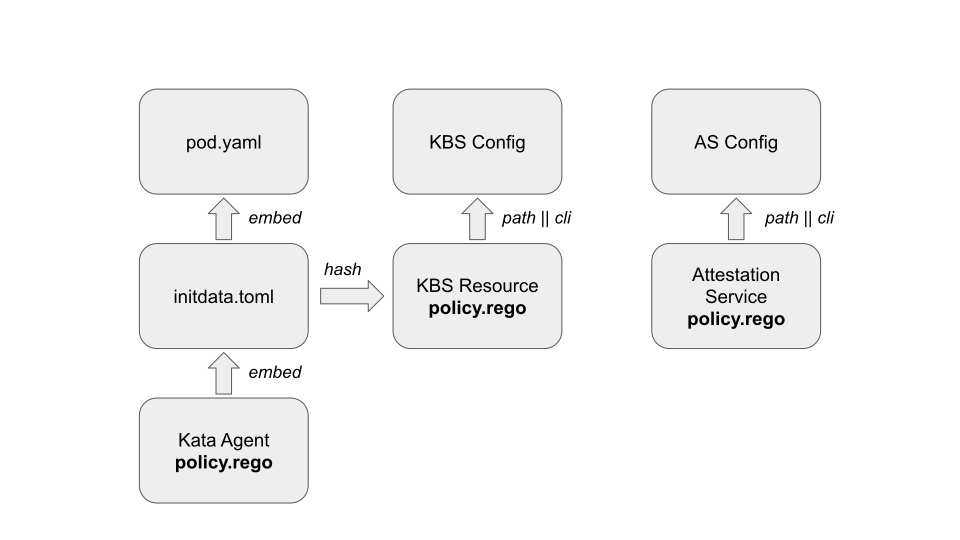
The diagram shows example Rego file names.
Those names are arbitrary.
Policies are always supplied by path via command line (e.g. kbs-client ... set-resource-policy --policy-file <path>) or config,
and the services use the file content, not the filename.
1. Kata Agent Policy (Inside the TEE)
The kata agent policy controls what operations the Kata agent can perform inside your TEE. This is your first line of defense against malicious or compromised Kubernetes control planes.
Example use cases:
- Prevent
kubectl execinto production pods - Restrict which container images can be launched
- Control which commands can be executed
Quick example of a restrictive kata agent policy:
package agent_policy
import rego.v1

default CreateContainerRequest := false
default ExecProcessRequest := false

# Only allow specific image digests
CreateContainerRequest if {
	input.storages[0].source == "docker.io/library/nginx@sha256:abc123..."
}
Kata agent policies get embedded in the Init-Data configuration file. That file provides additional configuration like where to look for Trustee.
Learn more: Agent Policies and Init-Data
2. KBS Resource Policy (At the KBS)
KBS resource policies control which secrets are released under what conditions. They inspect the attestation token from your workload to make decisions.
Example use cases:
- Verify the workload is using a specific kata agent policy (via Init-Data hash)
- Only release database credentials to attesting TDX guests
- Require specific trust levels (affirming vs contraindicated)
- Different secrets for different platforms (TDX vs SNP)
Example: Checking Init-Data hash
When you provide Init-Data in your pod (with a kata agent policy), the Attestation Service verifies it and includes the hash in the token. Your KBS resource policy can verify the specific Init-Data hash to ensure the exact kata agent policy was used:
package policy
import rego.v1

default allow = false

# Only release secrets to workloads with the expected Init-Data hash
allow if {
	input["submods"]["cpu0"]["ear.status"] == "affirming"
	# Verify the specific Init-Data hash (includes kata agent policy + config)
	input["submods"]["cpu0"]["ear.veraison.annotated-evidence"]["init_data"] == "expected-hash-here"
}
Use the hash algorithm you specified in the initdata.toml file to calculate
the expected value. For example with TDX you would have specified sha384 and at
a command line you could run:
sha384sum initdata.toml
Learn more: KBS Resource Policies
3. Attestation Service Policy (At the Attestation Service)
Attestation service policies define how hardware evidence is evaluated - what measurements are acceptable, which reference values to compare against, and how to calculate trust vectors.
Example use cases:
- Define acceptable firmware versions
- Specify required security levels for different workloads
- Map hardware measurements to trust claims
Learn more: Attestation Service Policies
CoCo ships with sensible default attestation policies for TDX and SNP. For most users, you only need to provide reference values - the policy is already configured appropriately.
Additional Security Features
Once you’ve configured the basics, explore these features for enhanced security: Features Overview
Quick Checklist for Production
Before deploying to production, ensure you’ve addressed:
- Selected the correct runtime class for your hardware
- Generated and embedded a kata agent policy appropriate for your workload
- Configured KBS resource policies in your KBS
- Provisioned reference values to the attestation service
Next Steps
- Deploy Trustee: Trustee Installation to enable attestation
- Advanced Policies: Deep dive into all policy types
- Cloud Deployment: Cloud Examples for AWS, Azure, GCP